Introduction
Have you ever wanted to save your Slack messages in a database? Why, might you ask, would one do that? You can use your Slack data for so many things, one example would be as training data for your LLM to answer questions about the organization, work being done, and about the people working there and actively sending messages.
We can capture these Slack messages using a pipeline that records all public channel events, like people joining a channel, workflow triggers, threads, and yes including messages.
Architecture Overview
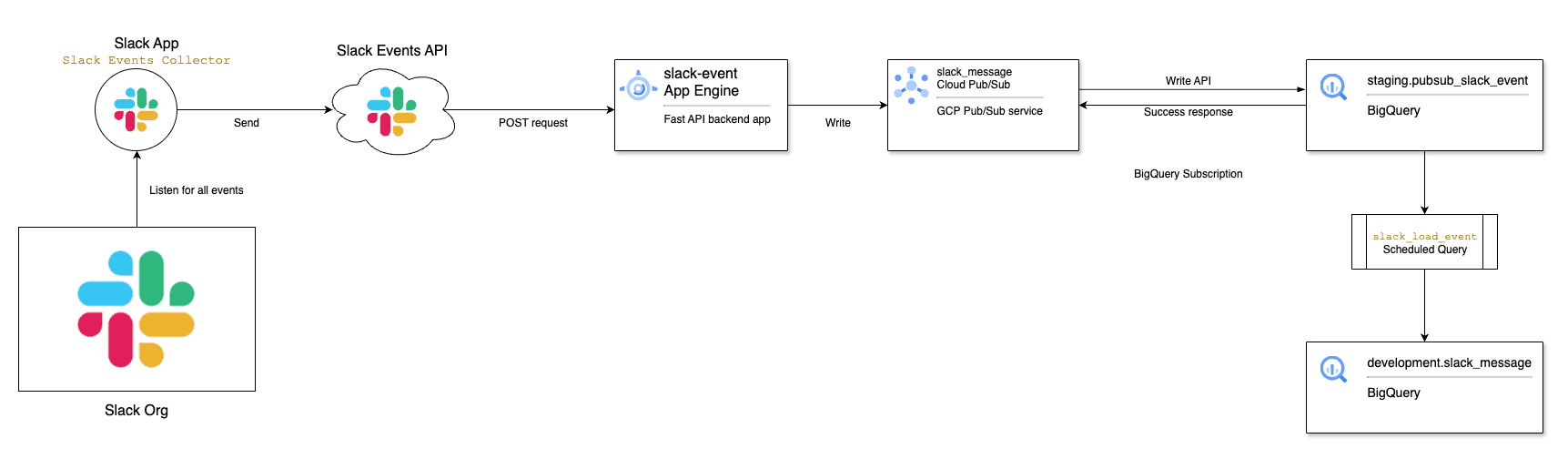
We will use a Slack App with the Events API to collect data. The app will listen for any message event and send it via a post request to our App Engine URL, in our GCP project, named slack_events.
The app engine listens for Slack events and writes them to a PubSub topic slack_message in the same GCP project.
We are using Pubsub's Write to BigQuery (Push) in the slack_message_bq subscription to automatically push any new message in the topic to a BQ table.
A BigQuery scheduled query will load data from the staging table loaded by PubSub to a destination table. The query will parse the JSON data into the appropriate columns depending on the message type and subtype.
Steps
-
Make sure you have a GCP billing account and enable the App Engine, PubSub, and BigQuery services.
-
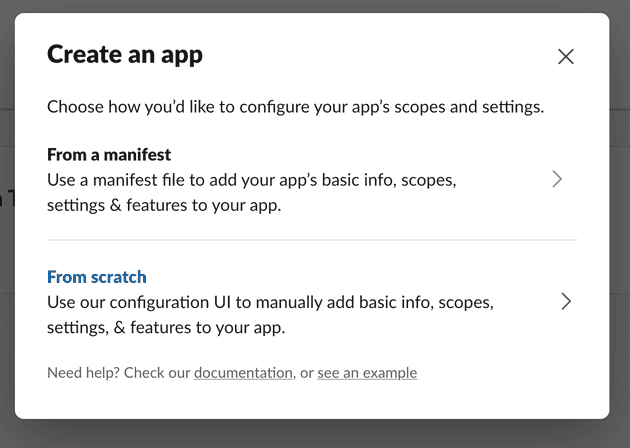
Next we need to create a Slack App that listens for all message events. Log in to your Slack and then click here to start creating the Slack App. Create an app from scratch
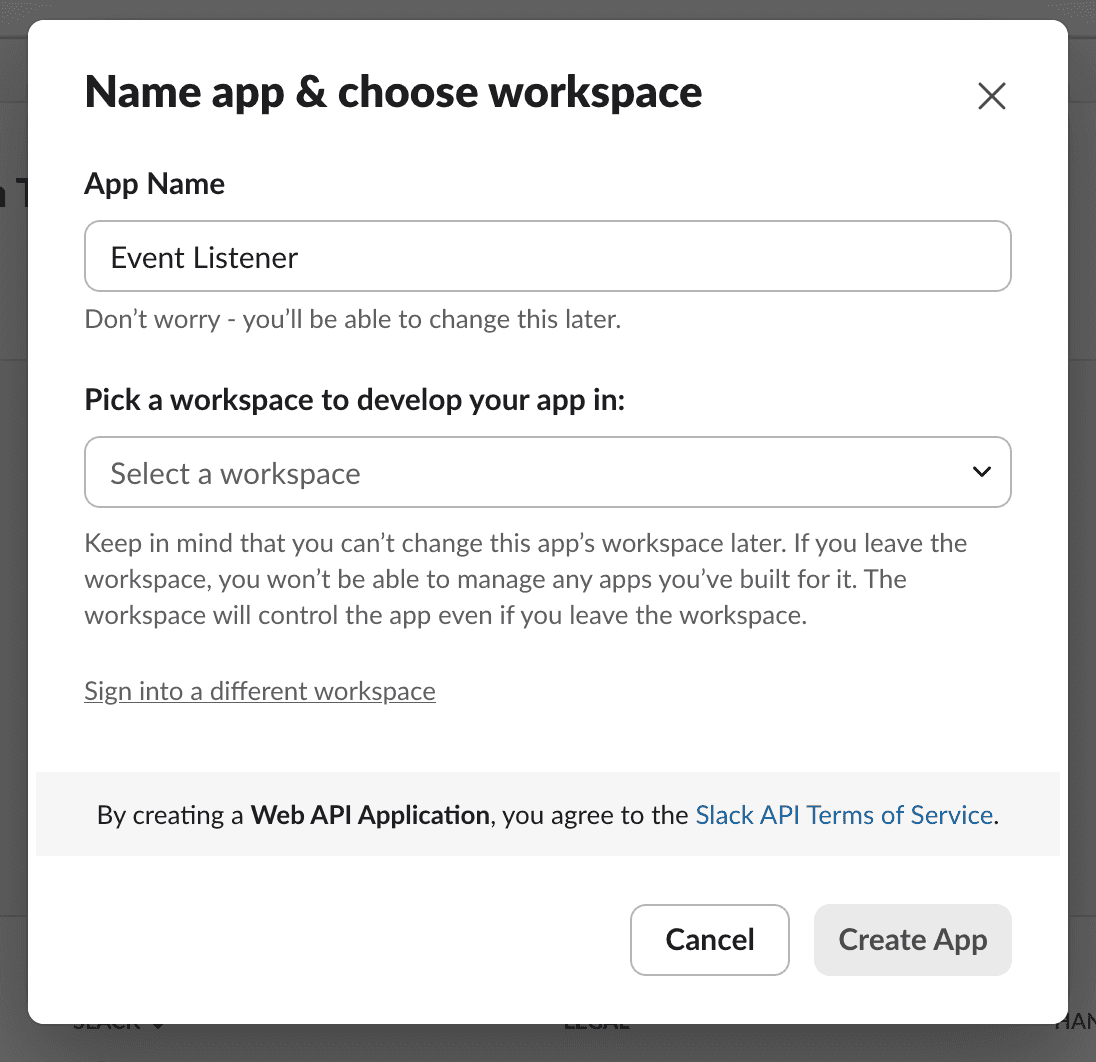
We will name it Event Listener
-
Once the app is created in the desired Slack workspace, select
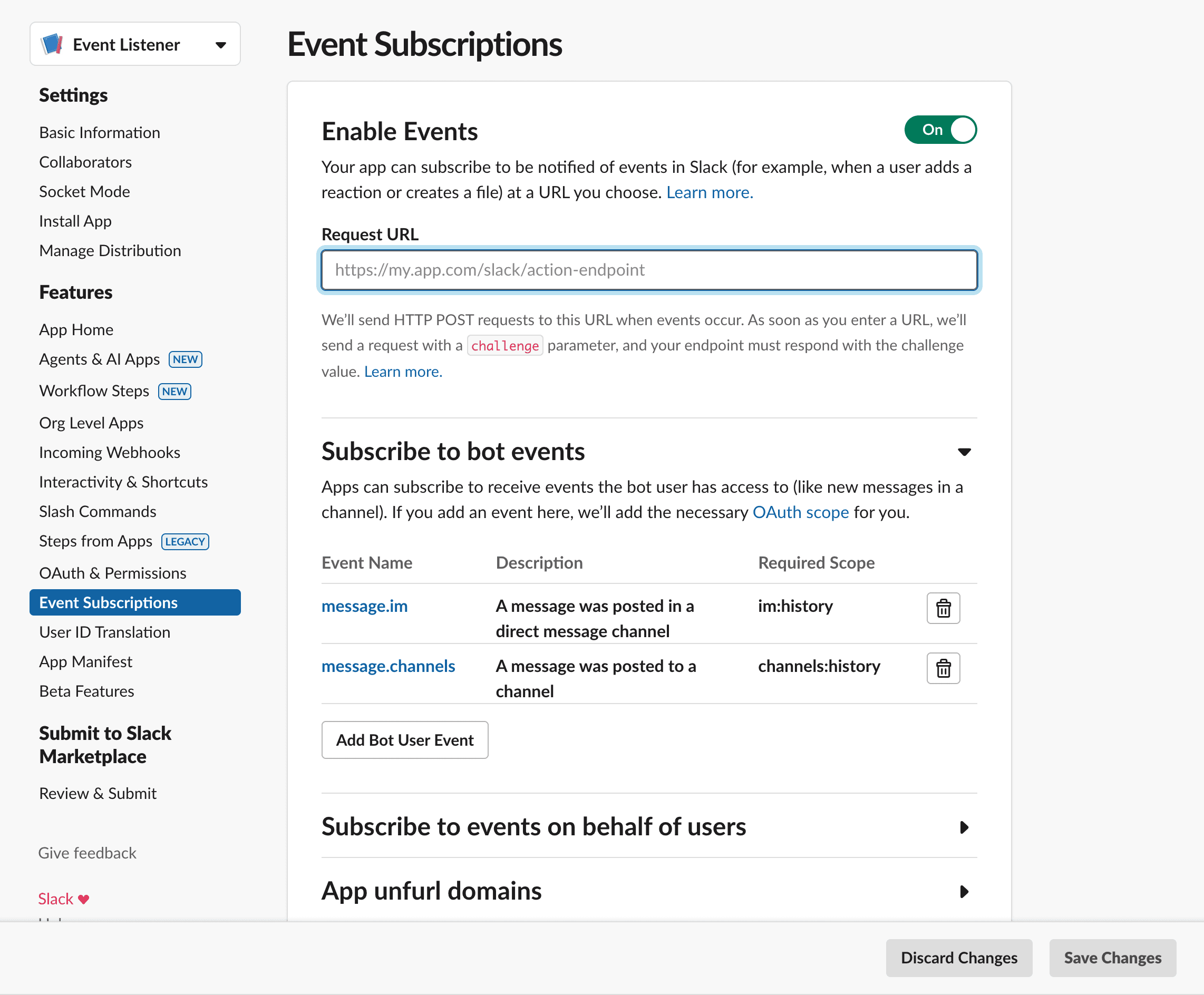
Event Subscriptionson the side menu, and then subscribe to all the events you want to keep track of. For now, we are only subscribing tomessageevents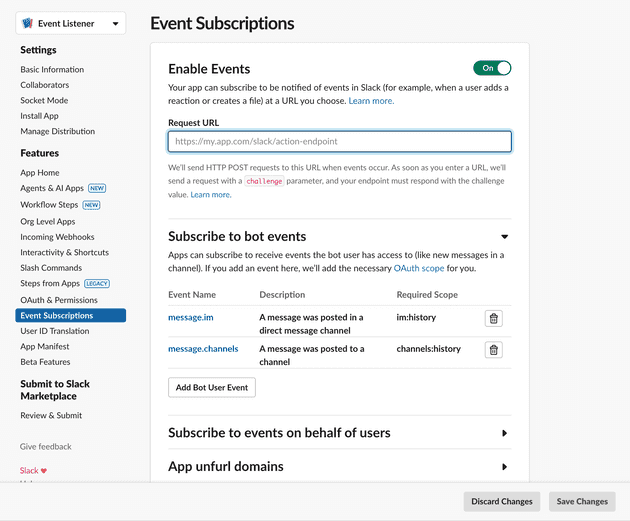
-
You will notice an input field labelled
Request URL. This will be the URL of our backend application where the Slack Events API will send POST requests with the data for each event. Our App Engine will be a simple Python backend using Fast API. -
Create a POST request endpoint that accepts the message events from the Slack API and sends that message to a PubSub topic
@app.post("/messages")
async def slack_events(request: Request, background_tasks: BackgroundTasks):
    """Handle Slack events and publish them to Pub/Sub in the background."""
    data = await request.json()
    # logger.info(f"Received Slack event") ## Optional - just for debugging

    # Check if this is a URL verification request
    if data.get("type") == "url_verification":
        return JSONResponse(content={"challenge": data.get("challenge")})

    # Add the task to the background queue
    background_tasks.add_task(
        push_pubsub,
        google_cloud_project,
        pubsub_topic,
        dict(data),
    )

    # Return immediately while the background task processes
    return JSONResponse(content={"status": "processing"})

# For local development
if __name__ == "__main__":
    import uvicorn
    uvicorn.run(app, host="127.0.0.1", port=8080)
- Create the function that pushes the data to Google PubSub using the environment variables passed from the .yaml file
# Configure Pub/Sub
pubsub_topic = os.getenv('PUBSUB_TOPIC')
google_cloud_project = os.getenv('GOOGLE_CLOUD_PROJECT')

print(f'PubSub Topic: {pubsub_topic}, Google Cloud Project: {google_cloud_project}')

def push_pubsub(project: str, topic: str, data: dict) -> None:
    try:
        publisher = pubsub_v1.PublisherClient()
        path = publisher.topic_path(project, topic)
        json_string = json.dumps(data, default=str)
        publish_future=publisher.publish(path, data=json_string.encode())
        message_id = publish_future.result()
    except Exception as e:
logger.error(f"Failed to publish message of ID {message_id}: {e}", exc_info=True)- Putting it all together and running our FastAPI app:
import json
import logging
import os

from fastapi import FastAPI, Request, BackgroundTasks
from fastapi.responses import JSONResponse
from google.cloud import pubsub_v1

# Configure logging
logging.basicConfig(level=logging.INFO)
logger = logging.getLogger(__name__)

# Initialize FastAPI app
app = FastAPI()

# Configure Pub/Sub
pubsub_topic = os.getenv('PUBSUB_TOPIC')
google_cloud_project = os.getenv('GOOGLE_CLOUD_PROJECT')

print(f'PubSub Topic: {pubsub_topic}, Google Cloud Project: {google_cloud_project}')

def push_pubsub(project: str, topic: str, data: dict) -> None:
    try:
        publisher = pubsub_v1.PublisherClient()
        path = publisher.topic_path(project, topic)
        json_string = json.dumps(data, default=str)
        publish_future=publisher.publish(path, data=json_string.encode())
        message_id = publish_future.result()
    except Exception as e:
        logger.error(f"Failed to publish message of ID {message_id}: {e}", exc_info=True)

@app.post("/messages")
async def slack_events(request: Request, background_tasks: BackgroundTasks):
    """Handle Slack events and publish them to Pub/Sub in the background."""
    data = await request.json()
    # logger.info(f"Received Slack event") ## Optional - just for debugging

    # Check if this is a URL verification request
    if data.get("type") == "url_verification":
        return JSONResponse(content={"challenge": data.get("challenge")})

    # Add the task to the background queue
    background_tasks.add_task(
        push_pubsub,
        google_cloud_project,
        pubsub_topic,
        dict(data),
    )

    # Return immediately while the background task processes
    return JSONResponse(content={"status": "processing"})

# For local development
if __name__ == "__main__":
    import uvicorn
    uvicorn.run(app, host="127.0.0.1", port=8080)
The full code can be found here.
-
Before deploying the App Engine, we need to create a PubSub topic named
slack_events_messagefor the App Engine to publish to. We need to add the name of the topic, along with the GCP project ID, as environment variables in the YAML file here. -
And we then create a BigQuery subscription to that topic that loads the data to our staging table
staging.pubsub_slack_event. -
Make sure you have the gcloud CLI installed, if not download it from here. We will then deploy this App by running
gcloud app deployinside theapp_enginedirectory. -
Get the URL of the
slack_eventsApp Engine service and paste it in the input field labelledRequest URLfrom Step 4 - in the Slack Events Subscriptions page. -
Create 2 datasets in BigQuery,
staginganddevelopment. Then create the tables that will receive the data
CREATE SCHEMA IF NOT EXISTS staging
OPTIONS (
  Description ="Initial raw data dataset"
);

CREATE SCHEMA IF NOT EXISTS development
OPTIONS (
  Description ="Development and testing dataset"
);

CREATE TABLE IF NOT EXISTS staging.pubsub_slack_event
(
    subscription_name STRING
  , message_id STRING
  , publish_time TIMESTAMP
  , attributes STRING
  , data STRING
)
PARTITION BY TIMESTAMP_TRUNC(publish_time, MONTH)
OPTIONS(
    description="Staging table to store the data from pubsub slack event"
  , require_partition_filter=TRUE
);

CREATE TABLE IF NOT EXISTS development.slack_message
(
    message_id STRING OPTIONS (description="PubSub message ID")
  , insert_timestamp TIMESTAMP OPTIONS (description="PubSub message insert timestamp")
  , team_id STRING
  , channel STRING
  , user_id STRING
  , username STRING
  , bot_id STRING OPTIONS (description="Slack bot ID in case the message is sent by a bot")
  , `type` STRING
  , subtype STRING
  , thread_ts STRING
  , `text` STRING
  , attachments ARRAY<STRING> OPTIONS (description="Slack message attachments")
  , auto_attachments ARRAY<STRING> OPTIONS (description="Attachments automatically added by Slack message preview")
  , event_ts TIMESTAMP OPTIONS (description="Slack event timestamp")
  , event_ts_epoch STRING OPTIONS (description="Slack event timestamp in epoch string format to be used as a unique key in combination with channel, user and bot_id")
)
PARTITION BY TIMESTAMP_TRUNC(insert_timestamp, MONTH)
CLUSTER BY message_id
OPTIONS(
    description="Slack public messages recorded from PubSub using Slack Events API"
  , require_partition_filter=TRUE
);- The last part of the pipeline is the data processing we need to do in BigQuery on the raw message data. We will create a BigQuery scheduled query for that. We need to:
- Select and parse the json data in
staging.pubsub_slack_event - Handle deleted and updated messages
- Load data to the destination table
development.slack_message
-- scheduled queries to insert Slack Events data from staging pubsub into destination
DECLARE start_ts TIMESTAMP;
DECLARE end_ts   TIMESTAMP;

BEGIN TRANSACTION;

SET (start_ts, end_ts) = (
  SELECT AS STRUCT
         TIMESTAMP_SUB(TIMESTAMP(@run_time), INTERVAL 2 HOUR) AS start_ts
       , TIMESTAMP(@run_time) AS end_ts
);


CREATE TEMP TABLE latest AS (
  SELECT message_id
       , publish_time AS insert_timestamp
       , JSON_VALUE(data, '$.team_id') AS team_id
       , JSON_VALUE(data, '$.event.channel') AS channel
       , COALESCE(JSON_VALUE(data, '$.event.user')
                , JSON_VALUE(data, '$.event.message.user')
                , JSON_VALUE(data, '$.event.previous_message.user')
         ) AS user_id
       , COALESCE(JSON_VALUE(data, '$.event.username')
                , JSON_VALUE(data, '$.event.message.username')
                , JSON_VALUE(data, '$.event.previous_message.username')
         ) AS username
       , COALESCE(JSON_VALUE(data, '$.event.bot_id')
                , JSON_VALUE(data, '$.event.message.bot_id')
                , JSON_VALUE(data, '$.event.previous_message.bot_id')
         ) AS bot_id
       , JSON_VALUE(data, '$.event.type') AS type
       , JSON_VALUE(data, '$.event.subtype') AS subtype
       , COALESCE(JSON_VALUE(data, '$.event.thread_ts')
                , JSON_VALUE(data, '$.event.message.thread_ts')
                , JSON_VALUE(data, '$.event.previous_message.thread_ts')
                , JSON_VALUE(data, '$.event.event_ts')
                , JSON_VALUE(data, '$.event.message.event_ts')
         ) AS thread_ts
       , COALESCE(JSON_VALUE(data, '$.event.text')
                , JSON_VALUE(data, '$.event.message.text')
                , JSON_VALUE(data, '$.event.previous_message.text')
         ) AS text
       , COALESCE(JSON_EXTRACT_ARRAY(data, '$.event.files'), JSON_EXTRACT_ARRAY(data, '$.event.message.files')) AS attachments
       , COALESCE(JSON_EXTRACT_ARRAY(data, '$.event.attachments'), JSON_EXTRACT_ARRAY(data, '$.event.message.attachments')) AS auto_attachments
       , TIMESTAMP_MILLIS(CAST(ROUND(CAST(JSON_VALUE(data, '$.event.event_ts') AS FLOAT64) * 1000) AS INT64)) AS event_ts
       , JSON_VALUE(data, '$.event.event_ts') AS event_ts_epoch
    FROM staging.pubsub_slack_event
   WHERE publish_time >= start_ts
     AND publish_time < end_ts
 QUALIFY ROW_NUMBER() OVER (PARTITION BY data ORDER BY publish_time DESC) = 1 -- Filter to keep only the latest row for each unique `data`
)

CREATE TEMP TABLE deletes AS (
  SELECT channel
       , COALESCE(JSON_VALUE(data, '$.event.previous_message.user'), '') AS user_id
       , COALESCE(JSON_VALUE(data, '$.event.previous_message.bot_id'), '') AS bot_id
       , JSON_VALUE(data, '$.event.previous_message.event_ts') AS event_ts_epoch
    FROM latest
   WHERE subtype IN ('message_deleted', 'message_changed')
);

DELETE FROM development.slack_message AS m
 WHERE m.insert_timestamp < end_ts
   AND (
    EXISTS ( -- check if the message is deleted
      SELECT 1
        FROM deletes AS d
       WHERE m.channel = d.channel
         AND COALESCE(m.user_id, '') = d.user_id
         AND COALESCE(m.bot_id, '') = d.bot_id
         AND m.event_ts_epoch = d.event_ts_epoch
    )
    OR (  -- delete all messages in the time range
          m.insert_timestamp >= start_ts
      AND m.insert_timestamp < end_ts
    )
  );

INSERT INTO development.slack_message
SELECT l.message_id
     , l.insert_timestamp
     , l.team_id
     , l.channel
     , l.user_id
     , l.username
     , l.bot_id
     , l.`type`
     , l.subtype
     , l.thread_ts
     , l.`text`
     , l.attachments
     , l.auto_attachments
     , l.event_ts
     , l.event_ts_epoch
  FROM latest AS l
  LEFT JOIN development.slack_message AS t
    ON l.message_id = t.message_id
   AND t.insert_timestamp >= start_ts
   AND t.insert_timestamp < end_ts
  LEFT JOIN deletes AS d
    ON l.channel = d.channel
   AND l.user_id = d.user_id
   AND l.bot_id = d.bot_id
   AND l.event_ts_epoch = d.event_ts_epoch
 WHERE t.message_id IS NULL
   AND d.channel IS NULL
   AND l.subtype NOT IN ('message_deleted');

COMMIT TRANSACTION;
- Once we deploy our scheduled query to run at a desired interval (I think once a day is reasonable), we will have a complete pipeline that can be tested by sending messages in public channels and seeing how they look in the BigQuery table!
Sweet!
In an upcoming blog, we will see how to use the message data collected in BigQuery to create a RAG database that will work as a knowledge base for an LLM.
Best regards