Coding assistants are not as good as advertised
Have you tried coding assistants and found that they are not good enough? You mihgt've felt that their ability to help you do a significant portion of the work has been overhyped. Sure, they work as a great auto-complete for your sentences or even function definitions. But how about building an entire SaaS from start to finish – backend, interface, deployment, etc?!
Some people recommend that you embrace Vibe Coding and use tools like Bolt, Lovable, Cursor etc. But these tools have their own set of problems. Plus, if you are a developer and you want to leverage your coding and architectural skills for the projects you're building while using AI as an assistant onto which you offload a lot of the manual tasks, this method I'm proposing will supercharge your productivity.
How to use your favourite coding assistant efficiently
I find that the best way to use coding assistants is at the start of a project. It can be a great tool for "scaffolding" the overall structure of your project with basic core functionality already generated by the AI. From there, you can take it forward by modifying, trimming, and adding code to make the initial prototype work. I found that this way of starting a project can get you to a working prototype in 4 hours!
The way we do this is by using the AI code assistant for 3 categories of tasks:
- Ideation - creating the code spec
- Prompt generation - generating the prompts that need to be used for code generation
- Code generation - running the prompts generated through the AI code assistant to generate the actual code
Let's break down each part of this process:
1. Ideation
In this step, we need to establish the context for the AI. We want to write down the project goal, the problem statement and the architectural design choices. We will do that with the help of the AI of course. We will ask it to help us create the spec.md file that has the project specifications and core features. We will prompt the AI to enter into a dialogue with us, asking us about our project requirements and design choices. Then based on the answer we give, a specifications file is generated, as spec.md, to be used in the next step.
We will try out this process using a sample project: An AI Github pull request reviewer. Enter the followiong prompt to your AI coding assistant of choice. I will be usong Github Copilot in this case:
Ask me one question at a time so we can develop a thorough, step-by-step spec for this idea. Each question should build on my previous answers, and our end goal is to have a detailed specification I can hand off to an engineer. Let's do this iteratively and dig into every relevant detail. Remember, only one question at a time.
Here's the idea: An LLM AI that works as a review agent for github pull requests. The AI has Tech Lead level expertise and also has a RAG knowledge base of the entire repository (and potentially other repositories and other documents). It can review code using a given set of directives in a .md file. It can review github pull requests using the github API by adding comments that highlight code segments and also give code change suggestions within the github pull request page.
Output would be: spec.md
The above prompt will start a conversation between me and the AI, where I answer the questions it poses one at a time. After around 15 minutes of back and forth, it generates a spec file that should look like this:
# AI-Powered GitHub Pull Request Review Agent Specification

## Overview

This document outlines the specifications for an AI-powered GitHub pull request review agent. The agent will act as a Tech Lead-level reviewer, leveraging a Retrieval-Augmented Generation (RAG) knowledge base and a Large Language Model (LLM) to provide detailed feedback on pull requests.

---

## Core Features

### Focus Areas

The AI will prioritize the following areas during its review:

1. **Performance issues and code optimization** (highest priority).
2. **Potential bugs and inconsistencies in data**.
3. **Code quality**.
4. **Adherence to coding standards**.
5. **SQL query optimization**.

### Review Scope

- **Comprehensive Review**: The AI will analyze the pull request in the context of the entire repository.
- **Diff Review**: The AI will focus on specific changes introduced in the pull request.

### Feedback Mechanism

- **Inline Comments**: The AI will add comments directly on the code in the diff.
- **Code Suggestions**: The AI will suggest specific code changes where applicable.

### Directives and Guidelines

- The AI will follow a set of directives and coding guidelines provided as `.md` files within the repository.
- These files will be specified through a YAML configuration file.

---

## Configuration

### YAML Configuration File

The YAML file will control the AI's behavior and include:

- **Directives**: Paths to `.md` files containing coding standards and guidelines.
- **Exclusions**: Files, directories, or types of changes to exclude from the review.
- **LLM Parameters**:

  - `temperature`
  - `max_tokens`
  - `top_p`
  - `frequency_penalty`
  - `presence_penalty`
  - `context_window_size`
  - `model_name`
  - `batch_size`
  - `retry_attempts`
  - `timeout`
  - `log_level`
  - `repository_context_limit`
  - `diff_context_limit`
  - `suggestion_limit`

- **LLM Backend**: Specify the LLM backend (e.g., OpenAI, Azure OpenAI, or local models) and provide tokens for each backend.
- **Update Frequency**: Adjustable parameter for periodic updates to the RAG knowledge base (default: weekly).

---

## Workflow

### Triggering the AI

- The AI will be triggered through a GitHub Actions workflow.
- By default, it will run for all pull requests, but the behavior can be adjusted via the workflow YAML file.

### Incremental Processing

- The AI will process files incrementally to handle large repositories or pull requests efficiently.

### Retry Mechanism

- If the selected LLM backend fails:
  1. Retry with a different LLM backend (if configured).
  2. Retry with a reduced context window size.
  3. Log the failure if all retries fail.

### Logging

- The AI will generate logs for each pull request, including:
  - General PR information (e.g., author, triggerer of the LLM API).
  - Analyzed files.
  - Skipped files.
  - Errors encountered.
- Logs will be stored alongside the pull request or in a designated location (to be determined).

### Notifications

- Critical issues (e.g., configuration errors or LLM failures) will trigger an email notification.

---

## Knowledge Base

### Multi-Repository Support

- The AI will use a RAG-based knowledge system to reference multiple repositories.
- Repositories will be integrated via the YAML configuration file.

### Update Mechanism

- The knowledge base will be updated periodically (default: weekly) with an adjustable frequency.

---

## Additional Features

### Dry-Run Mode

- A dry-run mode will validate the configuration before production use:
  - Check YAML syntax and required parameters.
  - Test connectivity to LLM backends.
  - Verify repository access.

### Consistent Style

- The AI will provide feedback in a single, consistent style using English.

---

## Security

- The AI will have **read-only access** to the repository.
- No additional security measures (e.g., encryption or restricted file access) are required.

---

## Out of Scope

- Effectiveness tracking (e.g., accepted/rejected suggestions).
- Localization or customization of feedback style.
- Configuration versioning.

---

## Future Considerations

- Suggestions for architecture and deployment:
  - **RAG Knowledge Base**: Use a vector database (e.g., Pinecone, Weaviate) to store embeddings of repository files for efficient retrieval.
  - **LLM Deployment**: Support cloud-based LLMs (e.g., OpenAI, Azure OpenAI) and local models (e.g., Hugging Face Transformers) for flexibility.
  - **Logs Storage**: Store logs in a centralized location (e.g., S3 bucket, database) for easy access and analysis.

---

## Conclusion

This specification provides a detailed blueprint for developing the AI-powered GitHub pull request review agent. The outlined features and configurations ensure flexibility, scalability, and efficiency in reviewing pull requests.
2. Prompt generation
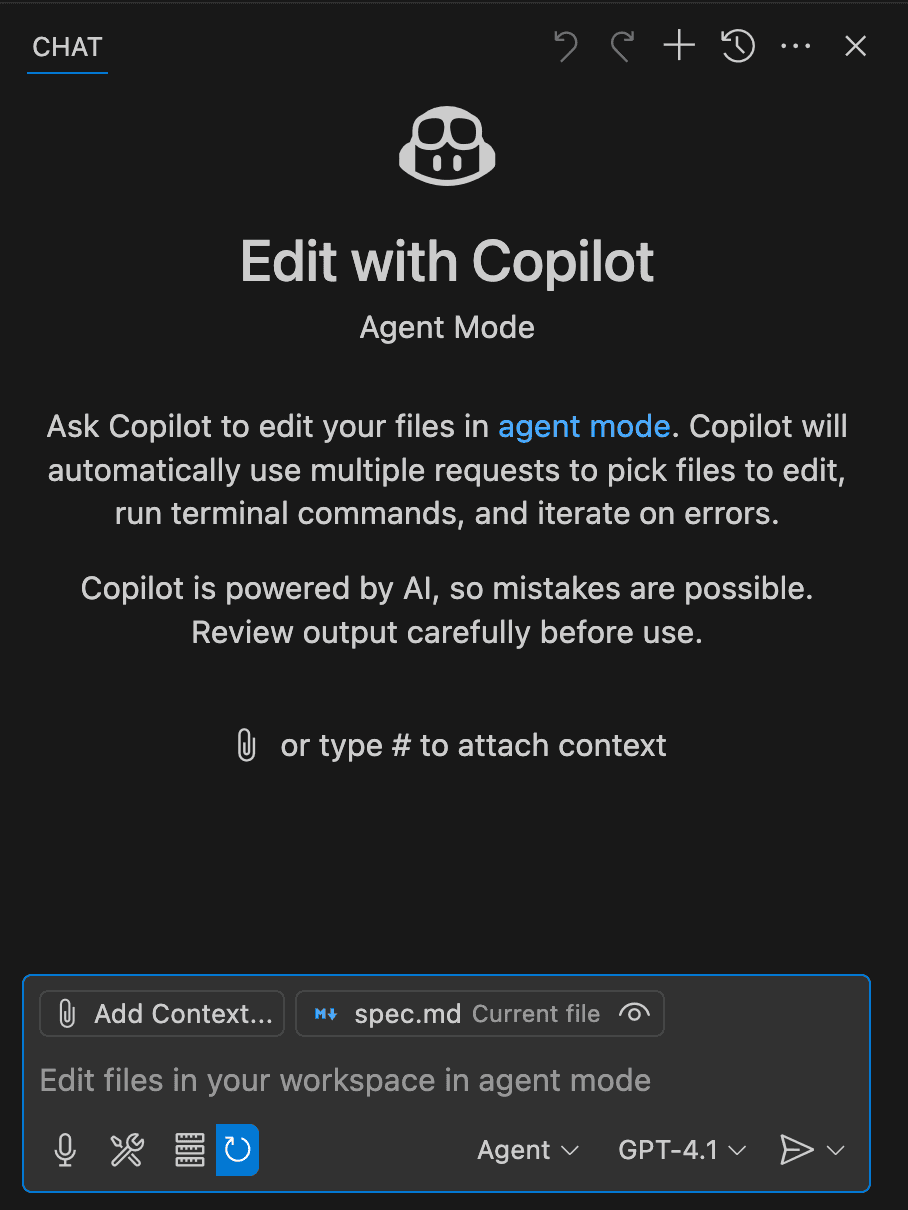
Now that we have the spec file for our application, it's time to use it to generate a set of prompts. These prompts will be the input to the AI coding assistant to generate the actual code in the next step. So, essentially we are prompting the code assistant to generate prompts for itself. To do that, we first set the spec.md file as a context. In VS Code + Copilot, this can be done from the Copilot chat UI on the left side:
Then we enter this prompt as an input:
Draft a detailed, step-by-step blueprint for building this project in this spec file. Then, once you have a solid plan, break it down into small, iterative chunks that build on each other. Look at these chunks and then go another round to break it into small steps. Review the results and make sure that the steps are small enough to be implemented safely with strong testing, but big enough to move the project forward. Iterate until you feel that the steps are right sized for this project.
From here you should have the foundation to provide a series of prompts for a code-generation LLM that will implement each step in a test- driven manner. Prioritize best practices, incremental progress, and early testing, ensuring no big jumps in complexity at any stage. Make sure that each prompt builds on the previous prompts, and ends with wiring things together. There should be no hanging or orphaned code that isn't integrated into a previous step.
Make sure and separate each prompt section. Use markdown. Each prompt should be tagged as text using code tags. The goal is to output prompts, but context, etc is important as well.
The above will result in a series of prompts that we store in prompts.md file:
Here’s a detailed step-by-step blueprint for building the AI-powered GitHub pull request review agent. The plan is broken into iterative chunks, with each chunk further divided into small, testable steps. Each step will include prompts for a code-generation LLM to implement in a test-driven manner.

---

## Step-by-Step Blueprint

### Phase 1: Core Setup and Configuration

1. **Set up the repository structure**:

   - Create a basic folder structure for the project.
   - Include directories for configuration, logs, and core functionality.

2. **Define the YAML configuration file**:

   - Create a YAML schema for specifying directives, exclusions, LLM parameters, and backends.
   - Write a parser to validate and load the configuration.

3. **Implement GitHub API integration**:

   - Set up authentication with GitHub using a personal access token.
   - Write a function to fetch pull request details and diffs.

4. **Set up logging**:
   - Implement a logging system to track activities, errors, and processed files.

---

### Phase 2: LLM Integration

1. **Integrate with LLM backends**:

   - Write a wrapper for interacting with multiple LLM backends (e.g., OpenAI, Azure OpenAI).
   - Include retry logic and fallback mechanisms.

2. **Implement prompt generation**:

   - Create a function to generate prompts for reviewing pull requests.
   - Include repository context, diff details, and directives from the YAML configuration.

3. **Test LLM responses**:
   - Write unit tests to validate the quality and structure of LLM responses.

---

### Phase 3: Pull Request Review Logic

1. **Analyze pull request diffs**:

   - Write a function to parse and analyze diffs.
   - Identify areas for inline comments and suggestions.

2. **Generate inline comments**:

   - Use LLM responses to create inline comments for specific code segments.
   - Format comments according to GitHub's API requirements.

3. **Post comments to GitHub**:
   - Write a function to post comments directly on the pull request using the GitHub API.

---

### Phase 4: Knowledge Base Integration

1. **Set up the RAG knowledge base**:

   - Use a vector database (e.g., Pinecone, Weaviate) to store embeddings of repository files.
   - Write a function to retrieve relevant context for pull requests.

2. **Periodic updates to the knowledge base**:
   - Implement a script to update the knowledge base weekly (or as configured).

---

### Phase 5: Workflow Automation

1. **Create a GitHub Actions workflow**:

   - Write a YAML file to trigger the AI for all pull requests.
   - Include steps to validate the configuration and run the review agent.

2. **Implement dry-run mode**:
   - Add a mode to validate the configuration and test connectivity without posting comments.

---

### Phase 6: Notifications and Finalization

1. **Add email notifications**:

   - Implement a function to send email notifications for critical issues.
   - Use a library like \`smtplib\` or an external service (e.g., SendGrid).

2. **Finalize and test the system**:
   - Conduct end-to-end testing with real pull requests.
   - Optimize performance and address any edge cases.

---

## Iterative Chunks and Prompts

### Chunk 1: Repository Setup and Configuration

**Prompt 1**:
\```text
Create a folder structure for a Python project with the following directories:

- \`config/\` for configuration files.
- \`logs/\` for log files.
- \`core/\` for the main functionality of the project.
  Include a \`README.md\` file in the root directory with a brief description of the project.
  \```

**Prompt 2**:
\```text
Write a YAML schema for the configuration file. The schema should include:

- \`directives\`: A list of paths to \`.md\` files containing coding standards.
- \`exclusions\`: A list of files or directories to exclude.
- \`llm_parameters\`: Parameters like \`temperature\`, \`max_tokens\`, and \`model_name\`.
- \`llm_backends\`: A list of LLM backends with their tokens.
- \`update_frequency\`: A parameter to specify the frequency of knowledge base updates.
  \```

**Prompt 3**:
\```text
Write a Python script to load and validate the YAML configuration file. The script should:

- Check for required fields.
- Validate the structure of the file.
- Raise errors for missing or invalid fields.
  \```

---

### Chunk 2: GitHub API Integration

**Prompt 4**:
\```text
Write a Python function to authenticate with the GitHub API using a personal access token. The function should:

- Accept the token as an argument.
- Return an authenticated session object.
  \```

**Prompt 5**:
\```text
Write a Python function to fetch pull request details using the GitHub API. The function should:

- Accept the repository name and pull request number as arguments.
- Return details like the author, title, and list of changed files.
  \```

**Prompt 6**:
\```text
Write a Python function to fetch the diff of a pull request using the GitHub API. The function should:

- Accept the repository name and pull request number as arguments.
- Return the diff as a string.
  \```

---

### Chunk 3: Logging System

**Prompt 7**:
\```text
Implement a logging system for the project. The system should:

- Write logs to a file in the \`logs/\` directory.
- Include timestamps and log levels (e.g., INFO, ERROR).
- Log activities like fetching pull request details and processing files.
  \```

---

### Chunk 4: LLM Integration

**Prompt 8**:
\```text
Write a Python wrapper for interacting with multiple LLM backends. The wrapper should:

- Accept backend-specific parameters (e.g., API tokens, model names).
- Include retry logic for failed requests.
- Support switching to a fallback backend if the primary one fails.
  \```

**Prompt 9**:
\```text
Write a function to generate prompts for reviewing pull requests. The function should:

- Accept the repository context, diff details, and directives as arguments.
- Return a formatted prompt string for the LLM.
  \```

---

### Chunk 5: Pull Request Review Logic

**Prompt 10**:
\```text
Write a Python function to parse and analyze pull request diffs. The function should:

- Identify code segments that require comments or suggestions.
- Return a list of segments with their line numbers.
  \```

**Prompt 11**:
\```text
Write a Python function to post inline comments on a pull request using the GitHub API. The function should:

- Accept the repository name, pull request number, and comment details as arguments.
- Post the comments directly on the pull request.
  \```

---

### Chunk 6: Workflow Automation

**Prompt 12**:
\```text
Write a GitHub Actions workflow YAML file to trigger the AI for all pull requests. The workflow should:

- Run on pull request events.
- Validate the configuration file.
- Execute the review agent script.
  \```

---

**Prompt 13**:
\```text
Create a file titled review_agent.py that uses and combines all the functions inside the core folder to be triggered by the github action workflow. This file should contain the main python entrypoint function and will run the PR review
\```

### Chunk 7: Notifications

**Prompt 14**:
\```text
Write a Python function to send email notifications for critical issues. The function should:

- Accept the recipient email, subject, and message as arguments.
- Use \`smtplib\` to send the email.
  \```

---

This iterative plan ensures incremental progress with strong testing and integration at every stage. Let me know if you'd like to refine any part of this!
3. Code generation
The last step in this part would be generating the actual code itself. Copy and paste each prompt onto your AI coding assistant one at a time. Wait for it to generate the files, folders, and code. After each output, spend some time reviewing the code and making sure everything makes sense before proceeding. The entire code base will be used as context for the next prompt so make sure you are happy with the result of each prompt before proceeding. This will ensure that unit testing is done early on in the development.
You will need to tweak a few things and perhaps even write your own code (gasp!). For instance, I haad to modify and organize some of the code above. I even create Prompt 13 myself, the final prompt needed to tie everything together, since it wasn't generated in the previous step.
You can find the full code here.
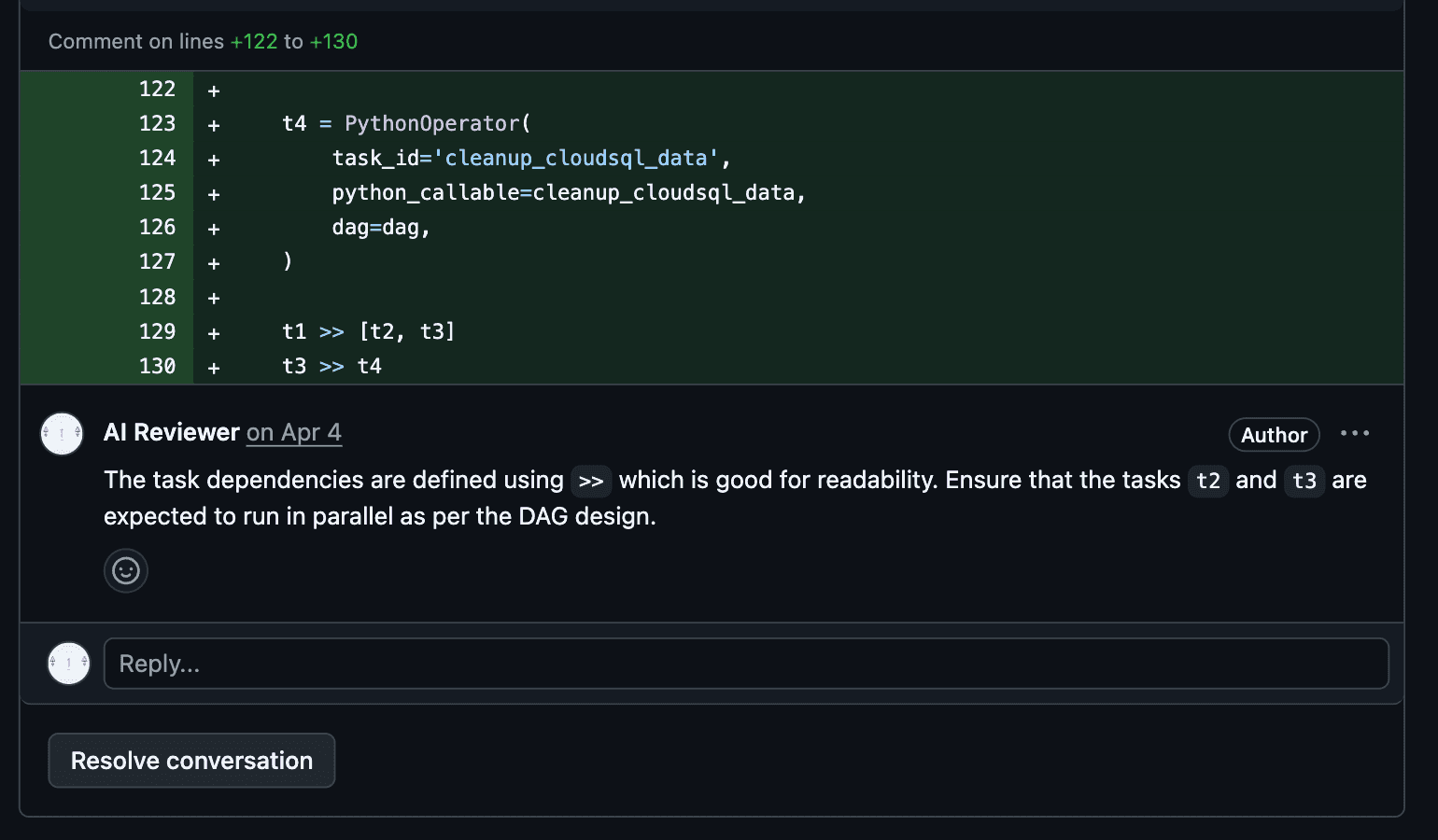
After creating an account to act as our AI reviewer, we need to generate a Github API key for it, with permission to read our repos and write comments on PRs. We also need to generate an API Token for our LLM to be used as our agent that takes in the PR diff and our formatted review prompt and returns review comments. We then add these API tokens to the appropriate place in our code and run our reviewer. We can trigger it manually or through github actions. This is what a review comment would look like:
Conclusion
Overall, I'd say I spent about 4 hours from start to finish, including debugging, modifying code (especially the default prompt format for the AI reviewer), and testing. Also, I'd say that roughly 20% of the code in the project was written by me. The remaining 80% were generated by the coding assistant, though most of the generated code was modified at least slightly.
In an upcoming blog, we will explore how to set up a landing page for this application that we have created, set up billing, and publish our app to be monetized!
Best regards